Command Line Interface
The actualpy command line interface (CLI) allows you to interact with your Actual Budget data directly
from the terminal without writing custom scripts.
Installation
Install the CLI with the optional CLI dependencies:
Initial setup
Before using any commands, you need to initialize a budget configuration:
$ actualpy init
Please enter the URL of the actual server [http://localhost:5006]:
Please enter the Actual server password:
(1) Test
Please enter the budget index: 1
Name of the context for this budget [test]:
Initialized budget 'test'
Once initialized, you can export your budget data:
$ actualpy export
Exported budget 'Test' (budget id 'My-Finances-0b46239') to '2024-10-04-1438-Test.zip'.
The configuration will be saved on the folder .actualpy/config.yaml. Check full help for more details:
$ actualpy --help

 Usage: actualpy [OPTIONS] COMMAND [ARGS]...

╭─ Options ─────────────────────────────────────────────────────────────────────────────────────────────────────────────────────────────────────────╮
│ --output              -o      [table|json]  Output format: table or json [default: table]                                                         │
│ --install-completion                        Install completion for the current shell.                                                             │
│ --show-completion                           Show completion for the current shell, to copy it or customize the installation.                      │
│ --help                                      Show this message and exit.                                                                           │
╰───────────────────────────────────────────────────────────────────────────────────────────────────────────────────────────────────────────────────╯
╭─ Commands ────────────────────────────────────────────────────────────────────────────────────────────────────────────────────────────────────────╮
│ init             Initializes an actual budget config interactively if options are not provided.                                                   │
│ use-context      Sets the default context for the CLI.                                                                                            │
│ get-contexts     Shows all configured contexts.                                                                                                   │
│ remove-context   Removes a configured context from the configuration.                                                                             │
│ version          Shows the library and server version.                                                                                            │
│ accounts         Show all accounts.                                                                                                               │
│ transactions     Show all transactions.                                                                                                           │
│ payees           Show all payees.                                                                                                                 │
│ budget           Shows the budget for a certain month.                                                                                            │
│ export           Generates an export from the budget (for CLI backups).                                                                           │
│ metadata         Displays all metadata for the current budget.                                                                                    │
╰───────────────────────────────────────────────────────────────────────────────────────────────────────────────────────────────────────────────────╯
Retrieving budget information
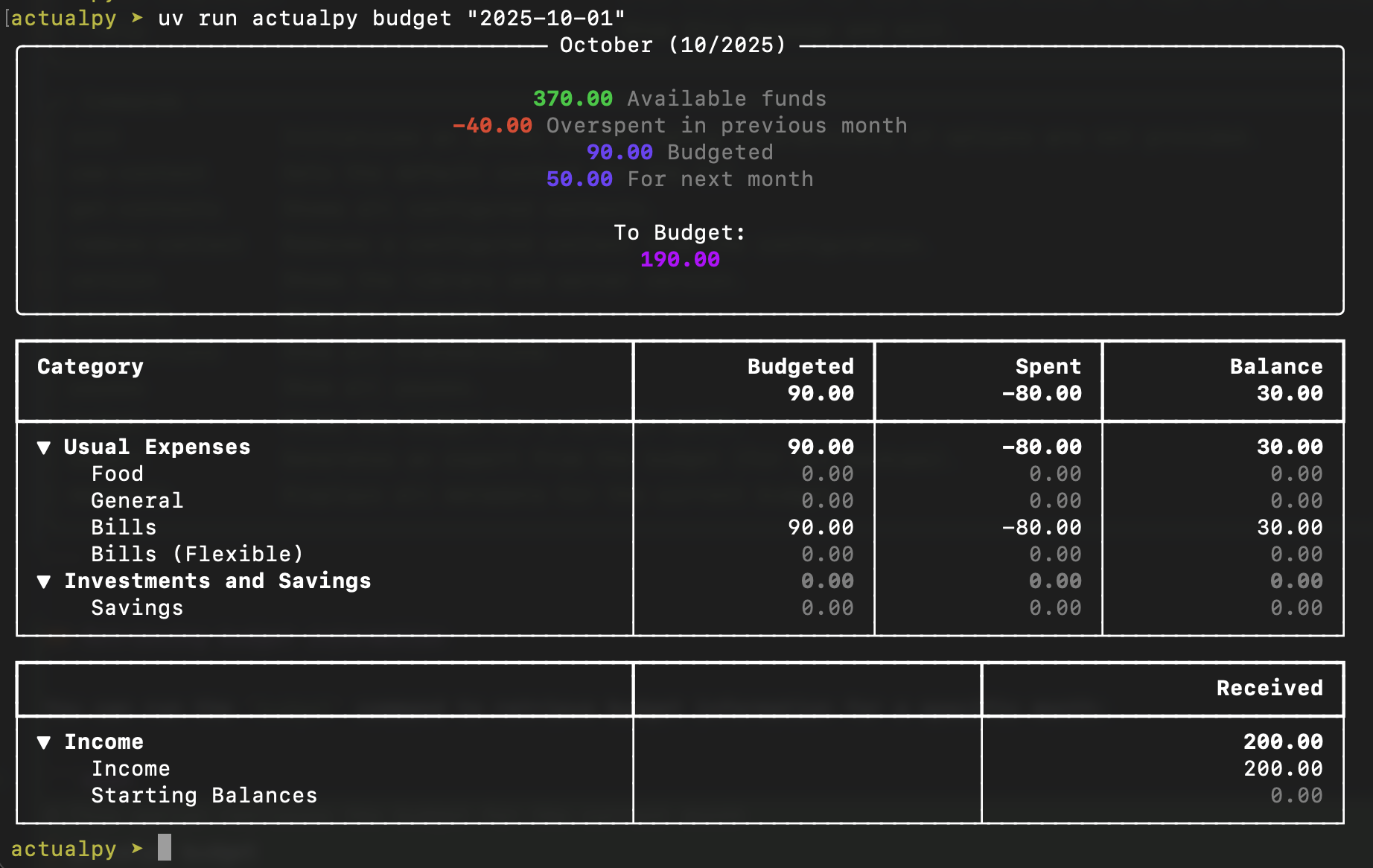
You can run the budget command to retrieve budget information for a specific month:
# This option retrieves the budget for the current month
$ actualpy budget
# You can also specify a month to retrieve the budget for, using the format YYYY-MM-DD (day is ignored)
$ actualpy budget "2025-10-01"
This should output a nicely formatted table with the budget information for the specified month:
If you'd rather want the budget information in JSON format, you can use the --output json option:
# Those two options are equivalent
$ actualpy --output json budget "2025-10-01"
$ actualpy -o json budget "2025-10-01"
You can use this in combination with tools like jq to extract specific fields from the budget information:
$ actualpy -o json budget "2025-10-01" | jq -r '.categoryGroups[].categories[] | "\(.name)=\(.budgeted)"'
Should output: